Instruments multipart
Learn everything about multipart instruments—how to create them, edit them, and manage their components.
A - Context
The multipart instrument mode is simply an extension of a regular instrument when it is made of several components. We created this module to fully describe the structure of a kit, and to detect missing instruments whenever one of the sub-parts is absent—meaning the instrument, or part of it, is not in the tray.
This requires describing the structure of the multipart instrument and considering each sub-part as an instrument by itself. There isn’t much more to know about subcomponents, except that they are handled exactly like regular instruments.
B - Use cases
There is multiples case that we need to describe regarding the presence of reference on the subcomponents.
-
(1) All subparts carry the same reference, which is used — in the listing — as the reference of the multipart instrument.
(TODO: check procedure with Kevin/Reda) -
(2) Only the main part is marked with a reference, which becomes — in the listing — the reference of the multipart instrument. The other parts have no marking.
- (3) Each subparts is marked with it's own reference, e.g. partx-1, partx-2 or very specific reference for them.
-
(4) A mixed case, where some parts share the same marking, while others have no marking at all.
The rule of thumb is simple:
- If a part has a marking, use that marking.
- If it doesn’t, set it as NOREFERENCE.
Try to align your description with the instrument’s subpart structure—this will make reprocessing much easier.
C - Features
C1 - Import / replace
While you try to add a multipart instrument or a sub part of a multipart instrument found by autocomplete. Ancitrak will ask you if you want to import the complete structure or only the subpart.
TODO : screenshot (demander a reda une composition avec un multipart)
While you try to replace a instrument by a multipart instrument. Acitrak will ask you if you want to import the complete multipart structure or only the subpart.
TODO : screenshot (demander a reda une composition avec un multipart)
D - Full procedure
Todo : add picture to illustrate
Let’s see the steps to add an instrument.
-
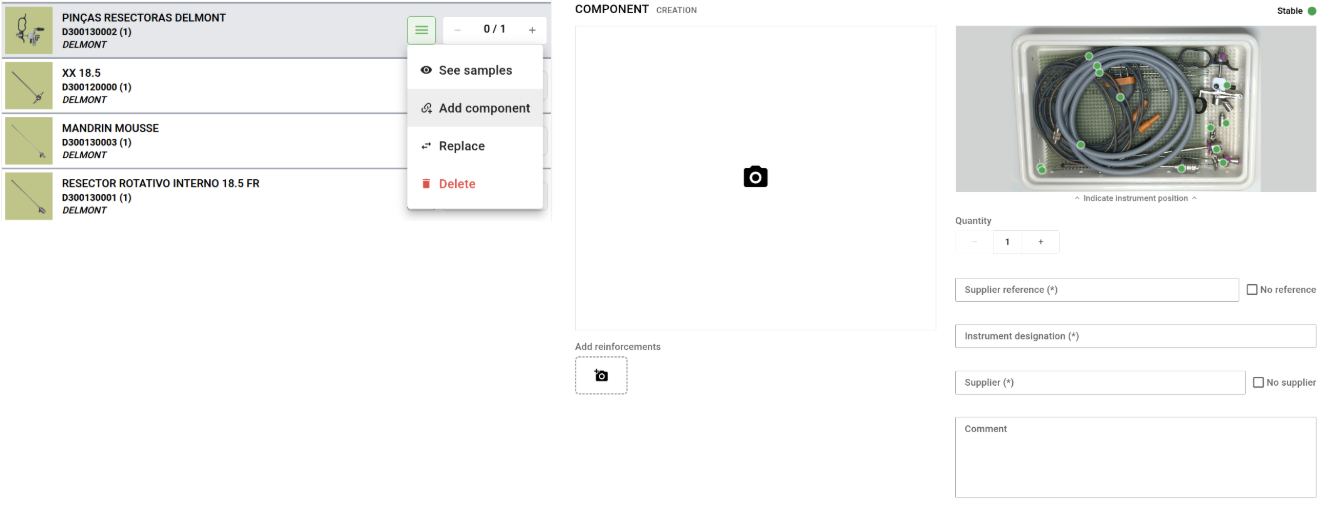
Click the instrument contextual menu and select Add component (see below : left), right panel will show the Component Creation form (see below : right)
-
Proceed exactly as if it was an instrument, by using autocomplete etc.
- Click add