
Instruments
Context :
Instruments are one of the core components of the Ancitrak and ActKloud data structure. They store all collaborative information required to uniquely identify each instrument among all those in existence. At the writing time of thoses lines there here are the informations that can be gathered.
- Supplier (e.g. Aesculap)
- Reference (e.g. BC284R)
- Localized designation (e.g. MAYO-LEXER DUROTIP DISSECTING SCISSORS 16 CM)
- Normalized Pictures (e.g. 45 deg oriented picture shown as below)
- [dec 25 : TO BE ADDED] Meta information (e.g., IFU pdfs, text, images, videos)

Use cases :
Identifying a cloud instrument is always done using the Supplier–Reference pair. As a result, the same Reference may exist across multiple suppliers. There is a wide range of possibilities regarding whether an instrument is marked or not. Ancitrak supports four distinct scenarios.
- (1) Supplier + Reference (e.g. Aesculap + FB402R)
- (2) Supplier + No Ref (e.g. Aesculap + NoRef)
- (3) No Supploer + Reference (e.g. NoSupp + 000129)
- (4) No Supplier + No Reference (e.g. NoSupp + NoRef)
Note that Ancitrak and ActKloud always require an identifier. This means that if an instrument is missing either a Supplier or a Reference, a corresponding placeholder value (e.g., NOREF1920 or NOSUPP5939) will be automatically generated by the system. You may encounter this placeholder in various parts of the system.
Features :
One specific aspect of our instrument images is the concept of reinforcement. Reinforcement images are additional viewpoints of an instrument that are integrated into the database to help the system recognise it more accurately in the future. Note that the main image (the one displayed in large) is also considered a reinforcement image.
General Interface
In instrument Creation (related to a kit), you will always find 3 visual components for creation.
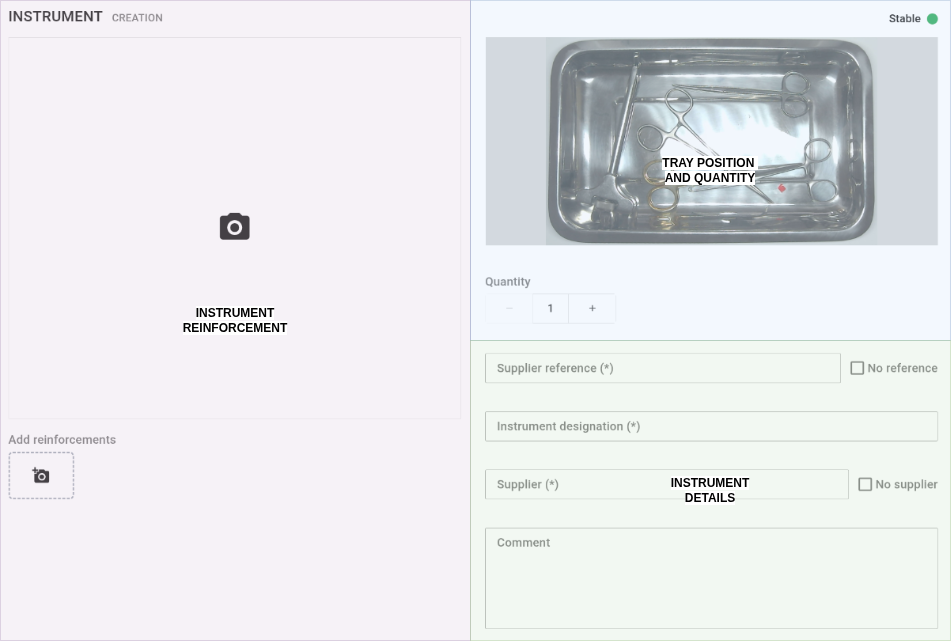
See below for a detailed explanation of each area.
Instrument Reinforcement Area
Instrument Reinforcement area correspond to where we can take multiple pictures of an instrument to enhance its recognition. There is 3 states depending on the ongoing actions :